November 20, 2024
How to Change 3D Control Preferences
Select your preferred 3D Control Preferences and match zoom, pan, and orbit controls to your CAD/ CAM program of choice
To change your 3D Control preference in Toolpath:
- Enter the User Preferences Dialog by clicking your name in the bottom left hand corner of Toolpath and selectingPreferences):
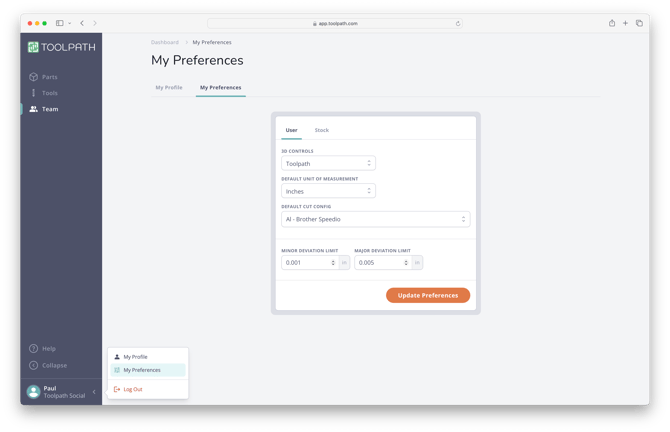
- Click on the3D Controlsdropdown and select your desired controls.
- SelectUpdate Preferencesto save your selection.
For reference, the 3D Controls available in Toolpath are detailed below:
-
Toolpath:
- Orbit: Left Click and Hold
- Zoom: Scroll Mouse Wheel
- Pan: Right Click and Hold
-
Fusion:
- Orbit: Shift + Hold MMB
- Zoom: Scroll Mouse Wheel
- Pan: Hold MMB
-
Alias:
- Orbit: Left Click and Hold
- Zoom: Scroll Mouse Wheel
- Pan: Hold MMB
-
Inventor:
- Orbit: Left Click and Hold
- Zoom: Scroll Mouse Wheel
- Pan: Hold MMB
-
Solidworks:
- Orbit: Hold MMB
- Zoom: Scroll Mouse Wheel
- Pan: Control + Hold MMB
-
Tinkercad:
- Orbit: Left Click and Hold
- Zoom: Scroll Mouse Wheel
- Pan: Control + Shift + Hold Right Click
-
PowerMill:
- Orbit: Hold MMB
- Zoom: Scroll Mouse Wheel
- Pan: Shift + Hold MMB
-
OnShape:
- Orbit: Hold Right Click
- Zoom: Scroll Mouse Wheel
- Pan: Hold MMB