September 29, 2025
Toolpath Add-In for Fusion Troubleshooting
The add-in is not functioning or doesn't show up in Fusion
Here are some potential solutions if the Toolpath add-in is not functioning or doesn't appear in Fusion.
-
- Make sure that Fusion and Toolpath are both up to date
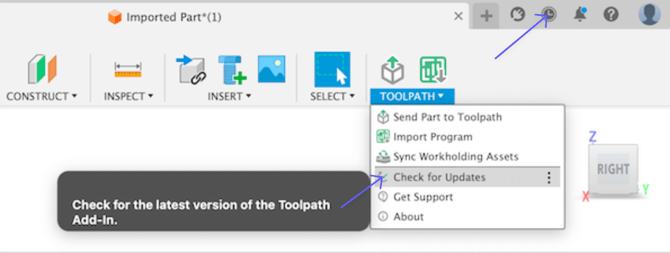
- Make sure that Fusion and Toolpath are both up to date
- Check to see if an Anti-virus software or a firewall are blocking the add-in. HP Wolf Security is known to cause issues.
- Check to see if your other Fusion add-ins are working. In any Fusion workspace, go to the Utilities tab and open "Scripts and Add-ins".
- Make sure the add-in isinstalled in the recommended locationand NOT installed to a Onedrive or Cloud folder.
- Reinstall the add-inHow To Install the Toolpath Add-In for Fusion
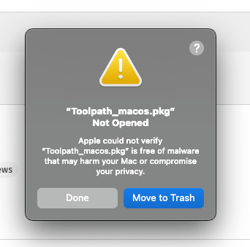
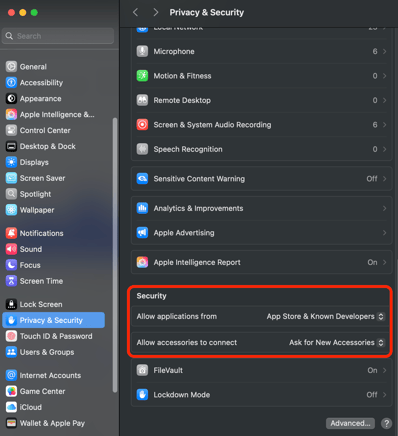
- If you are receiving the "Toolpath_MacOS.pkg not opened" message shown below, change your security settings to "Allow applications downloaded from the app store and identified developers":
- Microsoft Edge often blocks downloads with a "this file isn't commonly downloaded" message. In this case, your Windows Defender settings are blocking the download. Downloading through another web browser or editing the Windows Defender settings.